Split
prodatum hints
Updated 2011-05-19
- Solo shortcuts (toggle solo state): Alt/Option+1/2/3/4
- Mute shortcuts (toggle mute state): CTRL+1/2/3/4
- Focus Name Input: CTRL+N
- Focus Value Out/ Input: CTRL+E
- Hidden shortcuts: B, N
- Shortcuts for knobs:
Up/Down: In-/Decrease value
SHIFT+Up/Down: Set to zero
SHIFT+Left: Set to minimum value
SHIFT+Right: Set to maximum value - You can use the Mousewheel to adjust values.
- You can right-click any widget to set it's value to it's original (preset) value (Exceptions: Channel selection, CC controller, envelopes, keyranges and transpose values from the keyboard).
- You can Drag and Drop preset files in the top area of the window (menu + navigation area). Using the Import menu entry you can Audit the program directly from the disk before you chose to import. YMMV.
- Audit-Import is non-destructive. When you decide not to import anything prodatum will upload your current work again.
- Double clicking an entry in one of the arp browsers will load the pattern into the arp editor.
- Double clicking the Patchcord Amounts will toggle between zero and it's previous value.
- Remember that you are editing the edit buffer which is overwritten in the moment you switch preset or channel. prodatum will be out of sync from the actual edit buffer when you switch channel or preset on the front panel of the hardware! You generally do NOT want that. Rule of thumb: use EITHER the frontpanel OR prodatum for all edits, coffee and good times.
- EXPERIMENT! Nothing is being written until you explicitely save (changes made in the arpeggiator editor are permanent instantly because the device works that way. My flash is worn out already and i can no longer save any arpeggiator patterns. prodatum tries to limit write operations to the flash memory by only sending changes when you release any of the valuators, so every change is only creating one write, no matter how hard you work the thing. This also means that you won't hear changes until you release the mouse button)!
- A right-click on a piano key will latch the note. Try in combination with an enabled arpeggiator while you tweak to instantly hear the difference.
- Drag on the case on any of the virtual pianos to change it's note velocity.
- You can open a different device by just changing the MIDI ports and the device ID, followed by a click on "Open" (NOTE: You have to set a different Device ID on each of your devices because prodatum uses the ID to distinguish between them).
- To support multiple devices, I've added a "-c file" command-line-option. It will create a new config file (using default settings) or load the config file if it already exists. It will be created/loaded in/from the config folder, so no full paths please, just the filename, eg: "prodatum -c xl-1.txt").
- If some widget is disabled it means it's not being used because of some other setting (eg, when you are in Omni-mode the FX channel selection is disabled because the FX channel in Omni mode is always the same as the selected MIDI channel).
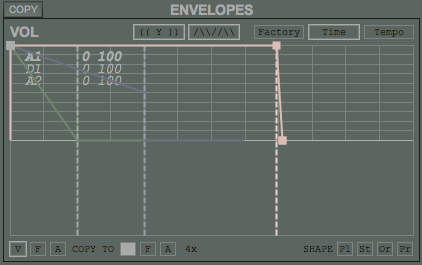
- When values overlap in the envelope editor, a list of those values appears once hovered. Use the mousewheel to select the desired value for dragging (see screenshot below).
- You can synchronize the settings of the envelope editors between voices with the "(( Y ))" button (useful to compare-adjust envelopes between voices).
- A second push on any of the "PROGRAM", "VOICE 1", "VOICE 2", "VOICE 3", "VOICE 4" or "MAIN" buttons at the top of the window returns to the previous selection. Example: when you have the "MAIN" screen selected and push "VOICE 1", a second push on "VOICE 1" selects "MAIN" again.
- If you ever feel lost while browsing the instruments/programs/riffs/etc, just press the "clear filter button" ("C") to scroll to the current selection.
- You can use the "Value Output" to manually enter a value of the previously edited parameter.
- If you are not sure about the effect of a parameter, try the tooltip.
- Tooltips can be switched on and off globally in the "Help" menu.
- The tooltip of the filter type shows filter information.
- Prodatum keeps all of it's data in a single folder: ..Application Data/prodatum/ in win or $HOME/.prodatum/ in linux and mac.
- Send your cool ideas or praise to rdxesy at yahoo de! Or better yet: Donate, so that i can eat a little more and code even longer!